🤖 Rekomendasi Query dengan PGAI
Fathiraz
Backend Engineer
Sebuah langkah kecil untuk mempermudah pekerjaan! 💬
Former presiden aja kaget...
Bayangin setiap case patching bisa langsung dapet saran SQL otomatis! 🤯
Gak perlu mikir SQL dari scratch lagi! 🎉
😩 Masalah yang Sering Dihadapi
- ⏰ Waktu lama buat bikin SQL manual
- 🔄 Query yang sama berulang-ulang
- ❌ Typo & syntax errors
- 📚 Susah mengingat pattern queries
- 🚫 Knowledge yang tersebar
🗂️ Agenda Hari Ini
🎯
Tujuan
🧠
Konsep AI
🐘
PGAI
⚡
Demo
🎯 Tujuan Utama
- 📦 Nyimpen semua resolved cases #kaffah-dev-support
- ✨ Auto-generate SQL suggestions untuk case baru
- ⏱️ Ngurangin waktu bikin SQL queries manual
- 🚀 Bikin proses patching lebih cepet & konsisten
- 🧠 Challenge: implementasi mini RAG di kitabisa!
🧮 Embeddings & Vectors
🔤 Embedding: Teks → Angka
Text: "Update nomor HP nasabah"
Embedding: [0.1, -0.3, 0.8, 0.2, -0.1, ...]
📏 Vector: Cara komputer "paham" makna
Teks yang mirip → Vector yang deket juga! 🎯
🐘 Kenapa PGAI?
❌ Sebelumnya
JavaScript + HuggingFace + Qdrant 😵
- 🛠️ Terlalu banyak tools untuk aplikasi simple
- 🔧 Setup kompleks & maintenance ribet
- 💸 Cost overhead multiple services
✅ Sekarang
PGAI All-in-One! 🎉
- 🗄️ Single database solution
- ⚡ Simple setup & maintenance
- 💰 Lower operational costs
🚀 PGAI: The Game Changer
- 🗄️ Native Postgres extension
- 📊 Built-in vector DB (bye Qdrant! 👋)
- 🔄 Auto embeddings creation
- 🤖 Multiple LLM support:
🛠️ Implementasi Step-by-Step
🔌
Setup PGAI
📋
Create Table
🧠
Auto Vectorizer
➕
Insert Function
💡
Suggest Function
🔌 Step 1: Setup PGAI
-- Initialize extensions
CREATE EXTENSION IF NOT EXISTS timescaledb CASCADE;
CREATE EXTENSION IF NOT EXISTS ai CASCADE;

-- Configure OpenAI
ALTER DATABASE coreins SET ai.openai.api_key TO 'your-api-key';
ALTER DATABASE coreins SET ai.default_llm TO 'pgai.openai';
ALTER DATABASE coreins SET ai.default_llm_model TO 'gpt-3.5-turbo';
Siap dalam hitungan detik! ⚡
📋 Step 2: Create Table
CREATE TABLE IF NOT EXISTS kaffah_patching (
    id SERIAL PRIMARY KEY,
    "name" VARCHAR(255) NOT NULL,
    "case" TEXT NOT NULL,
    "query" TEXT NOT NULL,
    "created_at" TIMESTAMPTZ DEFAULT NOW(),
    "updated_at" TIMESTAMPTZ
);
Simple table structure, nothing fancy! 📊
🧠 Step 3: Auto Vectorizer
PGAI magic: auto-embeddings saat data insert! ✨
SELECT ai.create_vectorizer(
    'kaffah_patching'::regclass,
    destination => 'kaffah_patching_embeddings',
    embedding => ai.embedding_openai('text-embedding-3-small', 768),
    chunking => ai.chunking_recursive_character_text_splitter('case')
);
No manual embedding process needed! 🙌
➕ Step 4: Insert Function
Auto-format SQL + save with embeddings
CREATE OR REPLACE FUNCTION insert_kaffah_patching(
    p_case TEXT,
    p_query TEXT,
    p_name TEXT
) RETURNS INTEGER AS $$
DECLARE
    new_id INTEGER;
    beautified_query TEXT;
BEGIN
    -- Format SQL query menggunakan GPT
    beautified_query := (
        SELECT ai.openai_chat_complete(
            'gpt-3.5-turbo',
            jsonb_build_array(
                jsonb_build_object(
                    'role', 'system',
                    'content', 'You are a SQL expert who formats queries.'
                ),
                jsonb_build_object(
                    'role', 'user',
                    'content', format('Beautify this SQL: %s', p_query)
                )
            )
        )->'choices'->0->'message'->>'content'
    );

    -- Insert data (embeddings auto-generated!)
    INSERT INTO kaffah_patching ("case", "query", "name")
    VALUES (p_case, beautified_query, p_name)
    RETURNING id INTO new_id;

    RETURN new_id;
END;
$$ LANGUAGE plpgsql;
💡 Step 5: Suggest Query
The RAG magic happens here! 🪄
CREATE OR REPLACE FUNCTION suggest_kaffah_patching(
    p_case TEXT,
    p_limit INTEGER DEFAULT 5
) RETURNS TABLE (suggested_query TEXT, context TEXT) AS $$
DECLARE
    context_chunks TEXT;
    generated_query TEXT;
    most_similar_embedding VECTOR(768);
BEGIN
    -- Generate embedding untuk input case
    most_similar_embedding := ai.openai_embed(
        'text-embedding-3-small', p_case, dimensions=>768
    );

    -- Cari case-case yang mirip (similarity search!)
    WITH ranked_cases AS (
        SELECT
            kp."case", kp."query",
            1 - (kpe.embedding <=> most_similar_embedding) as similarity_score
        FROM kaffah_patching kp
        JOIN kaffah_patching_embeddings kpe ON kpe.id = kp.id
        WHERE 1 - (kpe.embedding <=> most_similar_embedding) >= 0.9
        ORDER BY kpe.embedding <=> most_similar_embedding
        LIMIT p_limit
    )
    SELECT string_agg(
        format('Case: %s\nQuery: %s\nScore: %s',
               "case", "query", similarity_score::numeric(10,2)
        ), '\n\n---\n\n' ORDER BY similarity_score DESC
    ) INTO context_chunks FROM ranked_cases;

    -- Generate SQL berdasarkan konteks (RAG in action!)
    SELECT ai.openai_chat_complete(
        'gpt-3.5-turbo',
        jsonb_build_array(
            jsonb_build_object(
                'role', 'system',
                'content', 'You are a SQL expert who adapts queries for new cases.'
            ),
            jsonb_build_object(
                'role', 'user',
                'content', format(
                    'Current case: %s\nSimilar cases: %s\nAdapt the query!',
                    p_case, context_chunks
                )
            )
        )
    )->'choices'->0->'message'->>'content' INTO generated_query;

    RETURN QUERY SELECT generated_query, context_chunks;
END;
$$ LANGUAGE plpgsql;
🔄 How It Works in Practice
📥 New Case
"Update nomor HP nasabah Joko"
🔍 Vector Search
Find similar resolved cases
🤖 LLM Generation
Adapt existing queries to new case
✨ Ready SQL!
Copy, paste, execute! 🚀
🎮 Demo Time!
Example Input:
SELECT * FROM suggest_kaffah_patching(
    'Update nomor HP nasabah Joko Widodo dengan polis 987654321'
);
Expected Output:
UPDATE customer_details
SET phone = '08123456789'
WHERE policy_number = '987654321';
Magic! ✨
💪 The Benefits
- ⚡ Lightning Fast - No more SQL from scratch
- 📈 Self-Improving - Better with more data
- 🛡️ Error Reduction - Consistent patterns
- 🧠 Knowledge Sharing - Team expertise preserved
- 🎯 Context Aware - Understands similarity
Already tested in Core Insurance bot! ✅
🎯 Why This Approach Rocks
❌ Before (JS + HuggingFace + Qdrant)
- Multiple services to maintain
- Complex setup & configuration
- Network latency between services
- Higher infrastructure costs
✅ Now (PGAI)
- Single database solution
- Familiar PostgreSQL syntax
- Zero network latency
- Lower operational overhead
📊 Real Results
Lihat hasil implementasi di Core Insurance bot! ✨
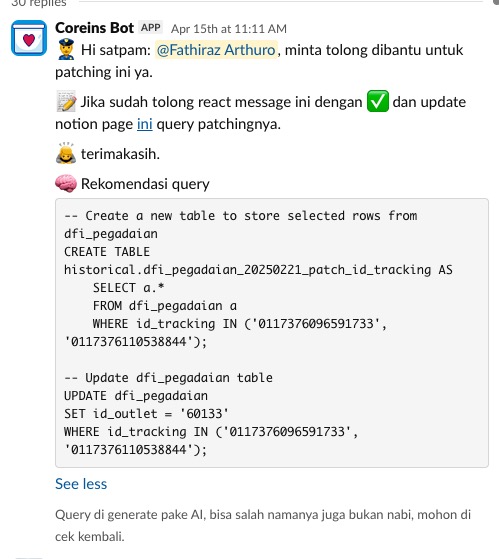
Bot otomatis generate SQL query berdasarkan case yang mirip! 🤖
🎉 Ready to Try?
Let's revolutionize how we handle SQL queries! 🚀
Questions? Let's discuss! 💬
✨ Terima Kasih!
Ada pertanyaan? 🤔
Atau mau ngobrol tentang AI lainnya? 🤖
Fathiraz - Backend Engineer Kitabisa
📧 Contact me for deep dive sessions! 💌